Showing posts with label code. Show all posts

Thursday, November 20, 2008

LaTex: Vertical Text

Scientific publications in computer science are often created using LaTeX. Here is a little tip for making text appear vertically in Latex.
First, you need to include the following library:
\usepackage{rotating}

Next, you can use the sideways environment, as follows:
\begin{sideways}YOURTEXT\end{sideways}

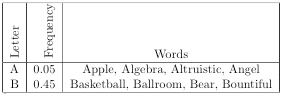
Finally here is an example used within a table:
\begin{tabular}{|r|r|c|}\hline
\begin{sideways}Letter\end{sideways} & \begin{sideways}Frequency\end{sideways} & Words \\
\hline
A & 0.05 & Apple, Algebra, Altruistic, Angel \\
B & 0.45 & Basketball, Ballroom, Bear, Bountiful \\
\hline
\end{tabular}

Which produces:
Monday, February 25, 2008

Quick Mac and Windows Keyboard Switching

Since Mac OS X doesn't save profiles for multiple keyboards (which I hope will change in subsequent versions), I had to find a solution for quickly changing between a Windows style keyboard and a Mac style keyboard. After spending some time with Google, I found some AppleScript that seems to provide an adequate solution. For convenience, I made two scripts: one called keyboard_win.scpt that switches the modifier keys on a Windows style keyboard to behave Mac-like, and one called keyboard_mac.scpt that restores the default keyboard behavior for a Mac style keyboard.

(1) keyboard_win.scpt:
(2) keyboard_mac.scpt:
Hopefully, this will save you some time.

Thursday, February 21, 2008

Escaping JavaScript and PHP

Here are some references for encoding and decoding in JavaScript and PHP, so that passing information via ajax or urls can be done cleanly.

The Art of Web - useful testing area for JavaScript and PHP.
W3Schools JavaScript Reference - just JavaScript

Tuesday, December 04, 2007

Javascript Word Jumper

Here is a little JavaScript I wrote that can be used to move the cursor between words within a input fields.